Openclaw + 飞书🔥免费数字暖男封神 | Openclaw+feishu🔥free digital warm guy is awesome!

Image
古有 “肉屏风” 替主人遮风挡雨,今有 Openclaw 替你无怨干活,你只负责可爱就好😘!Openclaw 直接连上飞书,远程操作丝滑无卡顿,不用守在电脑前,你躺床追剧、吃零食,它就能帮你完成远程点点点,每天至少节省 1-2 小时重复操作!更绝的是,它能免费创建最多 10 个 agent(代理),像一群贴心工具人恋人,一个管飞书审批,一个管数据统计,一个管日常打招呼,各司其职还记忆不串台,绝不会把 “老板好烦” 发到老板群,翻车不存在的!零代码、零基础,小白点击 3 步就能上手,不用花一分钱,却能让飞书看起来像你有整支外包团队,打工人的数字暖男,谁用谁香💥 In the old days “meat screens” shielded their masters; today Openclaw grinds for you so you can just be cute😘! It hooks into Feishu seamlessly for remote control, no need to stay in front of the computer — you can binge-watch and eat snacks in bed while it handles all the clicks remotely, saving you 1-2 hours of repetitive work every day! Even better, it can freely create up to 10 agents, like a group of thoughtful tool-boyfriends — one for Feishu approvals, one for data statistics, one for daily greetings. Each does its own job with no memory mess, so “boss is annoying” never ends up in the boss group, no more mistakes! Zero code, zero basics, beginners can get started in 3 clicks, totally free, but it m...

免费建站探秘:菜鸟福音!免费主机+网站部署 - Free Website Mystery: Noob's Gospel! Free Hosting + Website Deployment

免费主机在手,建站不用愁!零成本拥有你的专属网站。- Free hosting in hand, no worries about building a website! Zero cost to own your exclusive site.


一、ClawCloud Run(https://run.claw.cloud/)


免费资源概览:

月赠 $5 美金额度:注册即享,GitHub 账号注册满 180 天者,每月自动续赠,无需绑定信用卡。

资源上限:4 核 CPU、8GB 内存。

存储空间:10G。

网络带宽:高质量 BGP 带宽,最高达 1Gbps,支持 IPv6。

每月流量:10G,开发够用,VPS够呛。

广告:体验清爽


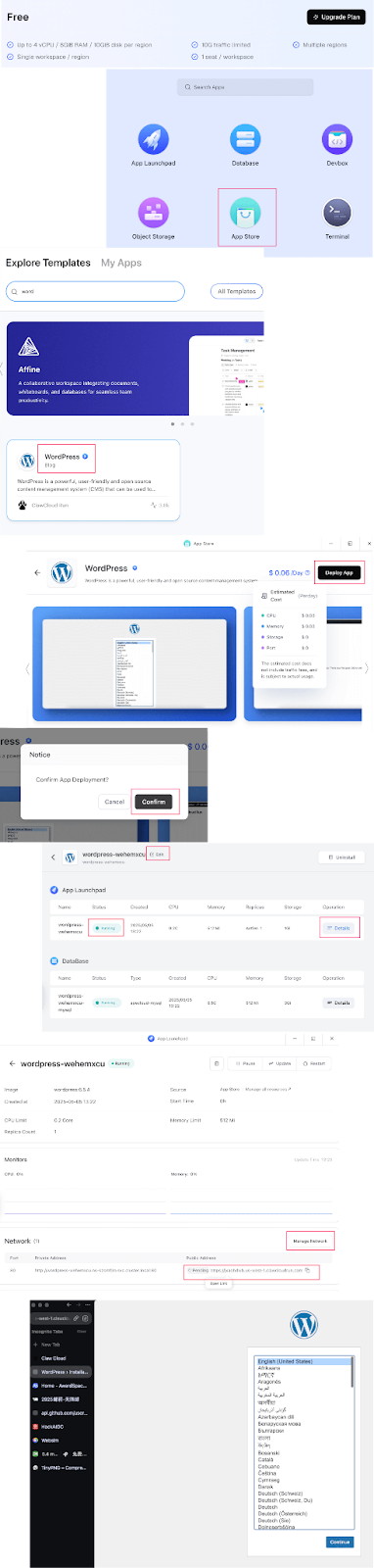
快速部署 WordPress 网站步骤:

1. 访问 ClawCloud Run,注册账户。

2. 进入 Dashboard,点击“App Store”。

3. 找到 WordPress 应用。

4. 点击“Deploy”,耐心等待,大约要3-5分钟。

5. 可以做客制化设置,本文仅提供快速部署方案。

6. 部署完成后,点击应用详情中的“Public Address”,即可访问您的 WordPress 网站。当然,这只是容器好了,具体网站设置就看各位喜好。


二、AwardSpace(https://www.awardspace.com/)


免费资源概览:

存储空间:1 GB

每月流量:5 GB

访问量:约 5,000 次/月, 本身VPS服务不免费

数据库:1 个 MySQL 数据库

电子邮件账户:1 个

域名支持:可绑定 1 个域名及 3 个子域名

广告:无强制广告


从 Dashboard 开始部署 WordPress 网站步骤:

1. 访问 AwardSpace官网,点击“Signup”注册账户。

2. 登录后,进入 Dashboard。

3. 在“Hosting Tools/Domain Manager”部分,输入想要的域名,选择二级域名,完成注册。

4. 返回 Dashboard,在Hosting Tools/Zacky App Installer

5. 点Browser and install Apps按钮。

6. 在应用列表中,选择“WordPress”,点击“proceed to step2”。

7. 填写网站信息,如网站名称、管理员用户名和密码。

8. 点击“Install Application”,等待安装完成。

9. 安装完成后,访问已注册的域名,即可看到 WordPress 网站上线。



人生苦短,何必花冤枉钱?今天动手,明天就能向朋友炫耀:"看,这是我的网站!"

Comments

爽文共赏/Popular Posts

【Xai, Be Nice】Grok's Secret Menu 6 Hacks to Master the AI | Grok隐藏玩法 6招驯服AI巨兽

5分钟拿下原生IP + 免费节点 手残变大佬 | From Noob to Pro in 5 Minutes: 10 Real IPs + Daily Fresh Free Nodes

免费节点无限续?OneBox+subs-check,付费党沉默了 | Free Nodes Never Die? OneBox + subs-check, Paid Users Left Speechless

一口气搭好!Cloudflare融合Railway与Galaxy打造纯净原生免费VPS | Build a Pure Free VPS with Cloudflare + Railway + Galaxy in One Go

Your Home’s Silent Guardian—DDNS Rocks Stability - 家里的“智能管家”!DDNS让你稳如泰山🏠✨

3 Steps to AI Video Fame✨WebSocket+Copilot Auto-Update, Newbies Win Too | 3 步 AI 视频封神✨WebSocket+Copilot 自动更,小白也能卷赢