Showing posts with label 免费. Show all posts

Tuesday, 25 November 2025

PSA: I just found the perfect tool to bring old photos back to life! |发现一个让老照片起死回生的魔法工具箱!🎞️✨

First OpenCV Adventure: How I Became a Photo Wizard in 10 Minutes | 技术小白的OpenCV初体验:原来谁都能轻松玩转AI修图

Just used OpenCV to colorize my grandma's old photo

When I saw her youthful smile in vibrant color

I literally got chills😭


🔧 What is this magic?


Free open-source computer vision library


Specializes in image & video processing


Can recognize faces, track objects, restore photos


💻 Installation is laughably easy:


brew install opencv

pip install opencv-python


Two commands and you're done!


🎨 Most heartwarming demo:

Used Python+OpenCV to auto-colorize black & white photos

Grandma's 1950 wedding photo came to life instantly

Even the lace details on her dress were perfect


📸 What it can do for you:

✅ Restore & colorize old photos

✅ Smart face recognition

✅ Real-time object tracking

✅ Video content analysis

✅ Image filtering


🌟 What won me over:


Completely free & open-source


Installs in seconds


Results will wow your friends


Pro tip: Skip Netflix this weekend

Restore your family old photos with OpenCV

The satisfaction is unreal!


刚学会用OpenCV给奶奶的老照片上色

看到她年轻时的笑容重现色彩

差点泪崩了😭


🔧 这是什么神仙工具?


免费开源的计算机视觉库


专门处理图像和视频


能识别人脸、追踪物体、修复照片


💻 安装简单到笑出声:


brew install opencv

pip install opencv-python


两行命令搞定,小白也能秒上手!


🎨 亲测超感人的例子:

用Python+OpenCV给黑白照自动上色

奶奶1950年的结婚照瞬间鲜活起来

连婚纱的蕾丝细节都完美还原


📸 它能帮你做什么:

✅ 老照片修复与上色

✅ 智能人脸识别

✅ 实时物体追踪

✅ 视频内容分析

✅ 图像滤镜处理


🌟 最打动我的三点:


完全免费,良心开源


安装简单,有手就会


效果专业,惊艳朋友圈


悄悄告诉你:这个周末别刷剧了

试试用OpenCV修复家族老照片

保证让你成就感爆棚!


Thursday, 6 November 2025

Stop Note-Taking Pain—AI One-Click, Efficiency Skyrockets | 别再苦抄笔记!用AI一键效率爆表💥

One prompt = hard work gone!  | 一个提示词,代替你爆肝!🤯

Tired of drowning in notes, reports, and feedback? Fear not! With DeepSeek-OCR, Codex, and Strella AI Interviews, you’ll build a smart note-taking app and run your life like a pro.

📸1. DeepSeek-OCR — Turns Text into Images, 10x Compression Magic!

Tons of PDFs crashing your LLM? DeepSeek flips logic—treats text as images, 512×512 visual tokens, 10x compression, 97% accuracy. 100 pages done in seconds, no token meltdown!

💻2. Codex — Code Faster Than Coffee Works!

Say: “Build me an AI app to analyze notes.”

Codex: “Got it!” — spits out TypeScript+React, pushes to GitHub! Free version fine, paid one godlike. 3 monthes’ project? Done in four days.

🧠3. Strella AI Interviews — AI Does Your User Research!

Zoom-like interviews, auto-follow-ups, live screen share, honest feedback, instant charts. No dropouts, 100% completion.

✨Example: Jane uses DeepSeek to compress notes → Codex to build an app → Strella to collect feedback. In 3 days, her AI notes app goes viral—teacher wants to buy it! 😂

🌈AI isn’t replacing you—it’s upgrading you! Try this trio and watch your stress evaporate!


是不是常常被笔记、报告、反馈搞得心态炸裂?别怕,我来救你!用三个AI神器——DeepSeek-OCRCodex、和Strella AI访谈,轻松打造一个“智能学习笔记App”,让生活像自动档一样丝滑~

📸第一剑:DeepSeek-OCR——笔记变图片,压缩10倍还更准!

以前一堆PDF笔记卡死LLM?DeepSeek这波逆天创新,把文字当图像看,512x512小图一压缩,token少10倍,还97%还原度!你100页资料?几秒钟扫完!从此再也不怕“token爆表”。

💻第二剑:Codex——3天速成程序媛!

打开VS Code,敲一句Prompt:“帮我写个能分析笔记的app。”

Codex:好嘞!TypeScript+React一气呵成,还自动push GitHub!

免费版能用,付费版更爽,作者亲测:3个月项目4天干完!😎

🧠第三剑:Strella AI访谈——AI主持用户调研!

AI像主持人一样Zoom访谈,实时提问、屏幕共享、生成反馈视频和图表。没人掉线,反馈更真实——比人类还会聊天!

✨实战例子:

小芳用DeepSeek把学习笔记变图压缩→用Codex做AI笔记app→再让Strella访谈同学找痛点。三天后,她的AI笔记App火到老师想买版权!😂

🌈AI让你不再加班、不再焦虑,反而更会偷懒!

赶紧收藏这套组合拳,升级你的生活Buff!


Monday, 17 March 2025

AI自动化白嫖路:OpenManus,香还是坑?

AI自动化,真香!然邀请码难求,幸有开源平替,白嫖党狂喜! AI automation is so appealing! But invite codes are hard to get. Fortunately, there are open-source alternatives, a boon for free users!


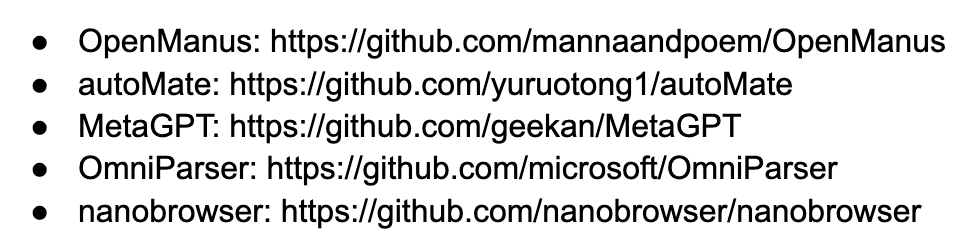
人工智能要奔自动化去了,瞧那Manus,火得一塌糊涂,可惜邀请码比天皇老子还难请。咱小民咋办?自然找免费货!如今有几个开源平替,OpenManus、MetaGPT、OmniParser、autoMate、nanobrowser,个个在GitHub上敞着门,可自用,可调用API,也可以做库:

这些玩意儿跟Manus差不多,还能自个儿改、自个儿装,省钱又省心。我拿OpenManus为例,其他的也大同小异。顺带一提,nanobrowser专搞浏览器,对标OpenAI Operator,要去Chrome store下载安装就可以用。

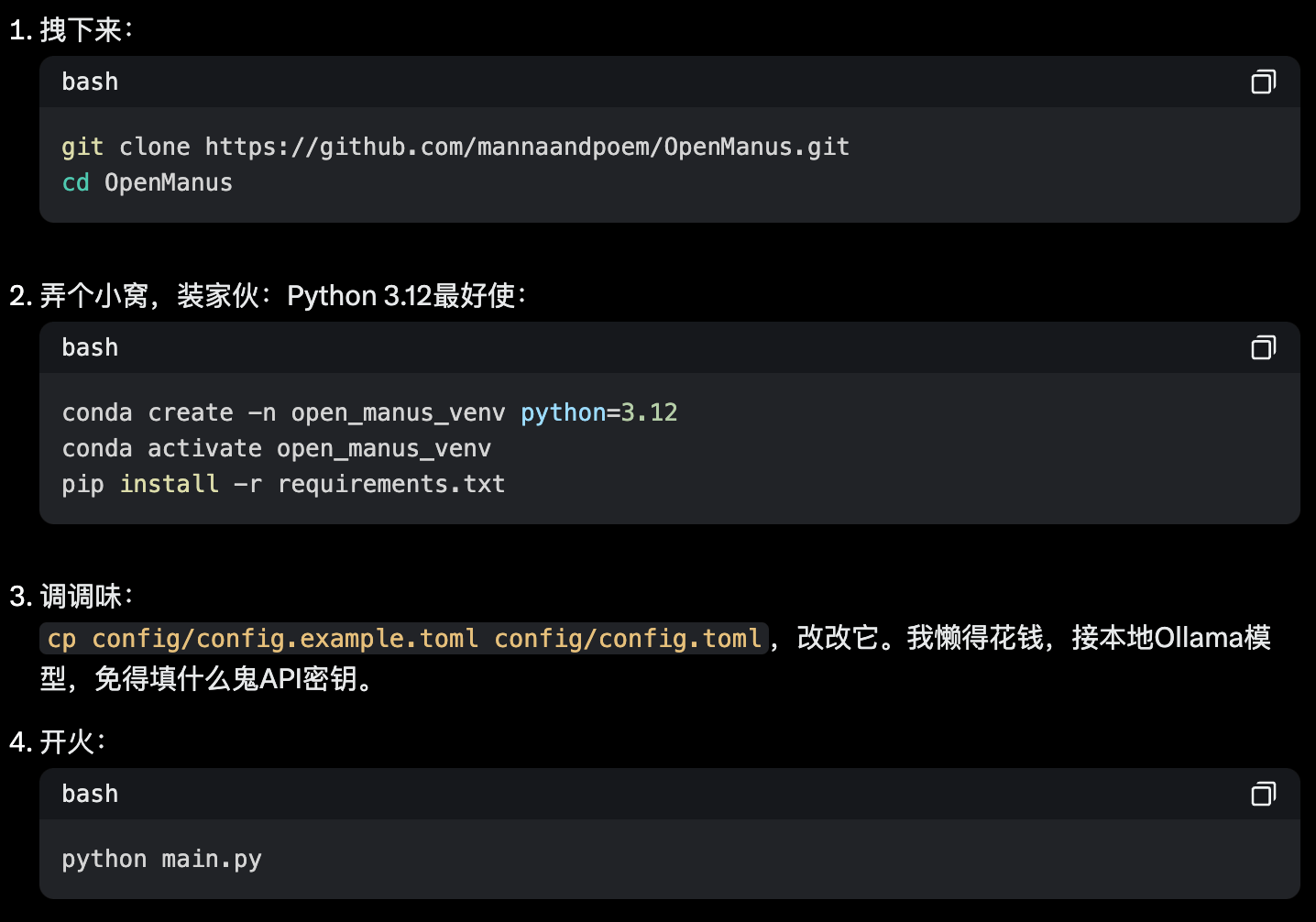
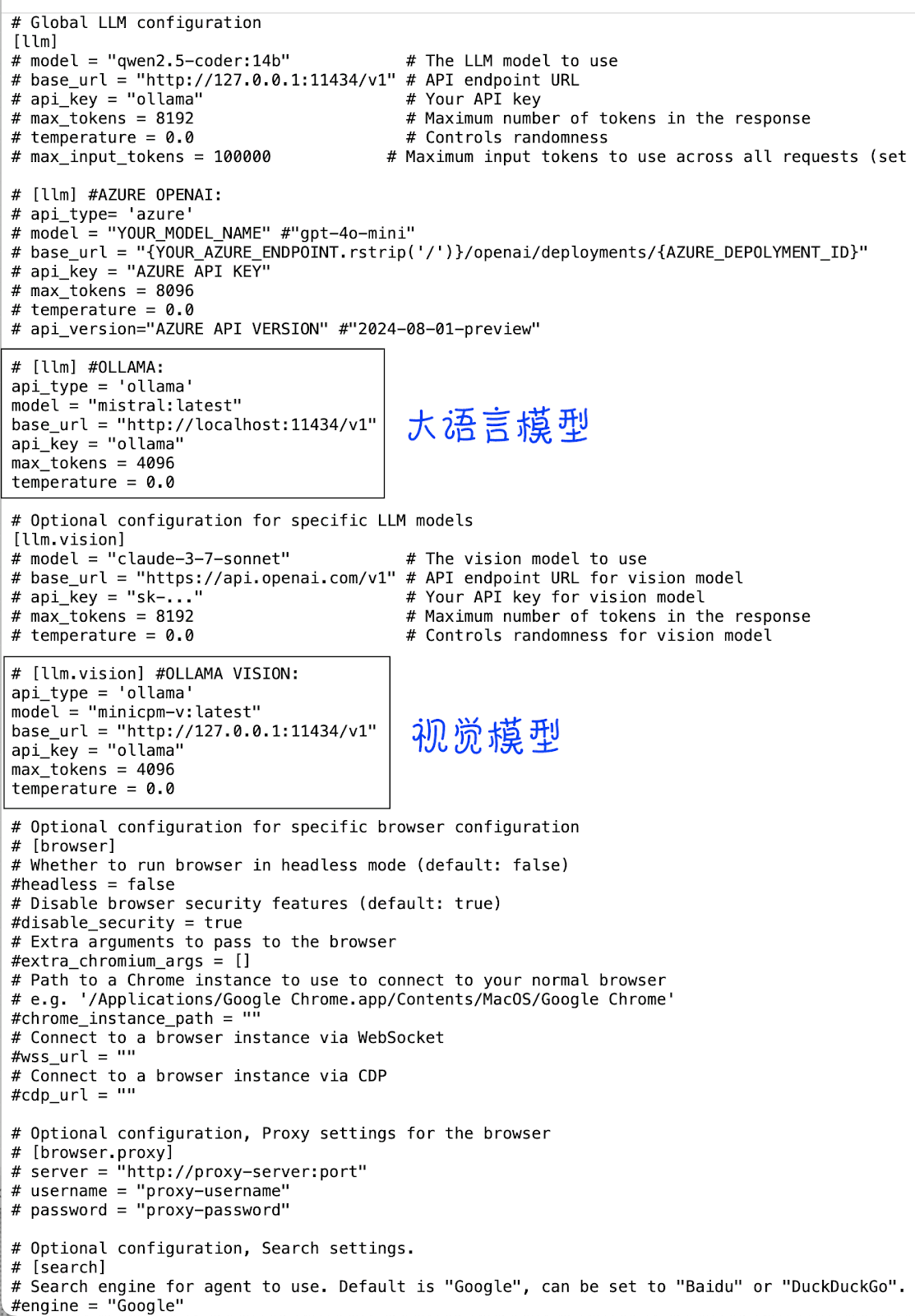
OpenManus装方法法和参考配置见图(创建你自己的配置文件: cp config/config.example.toml config/config.toml)

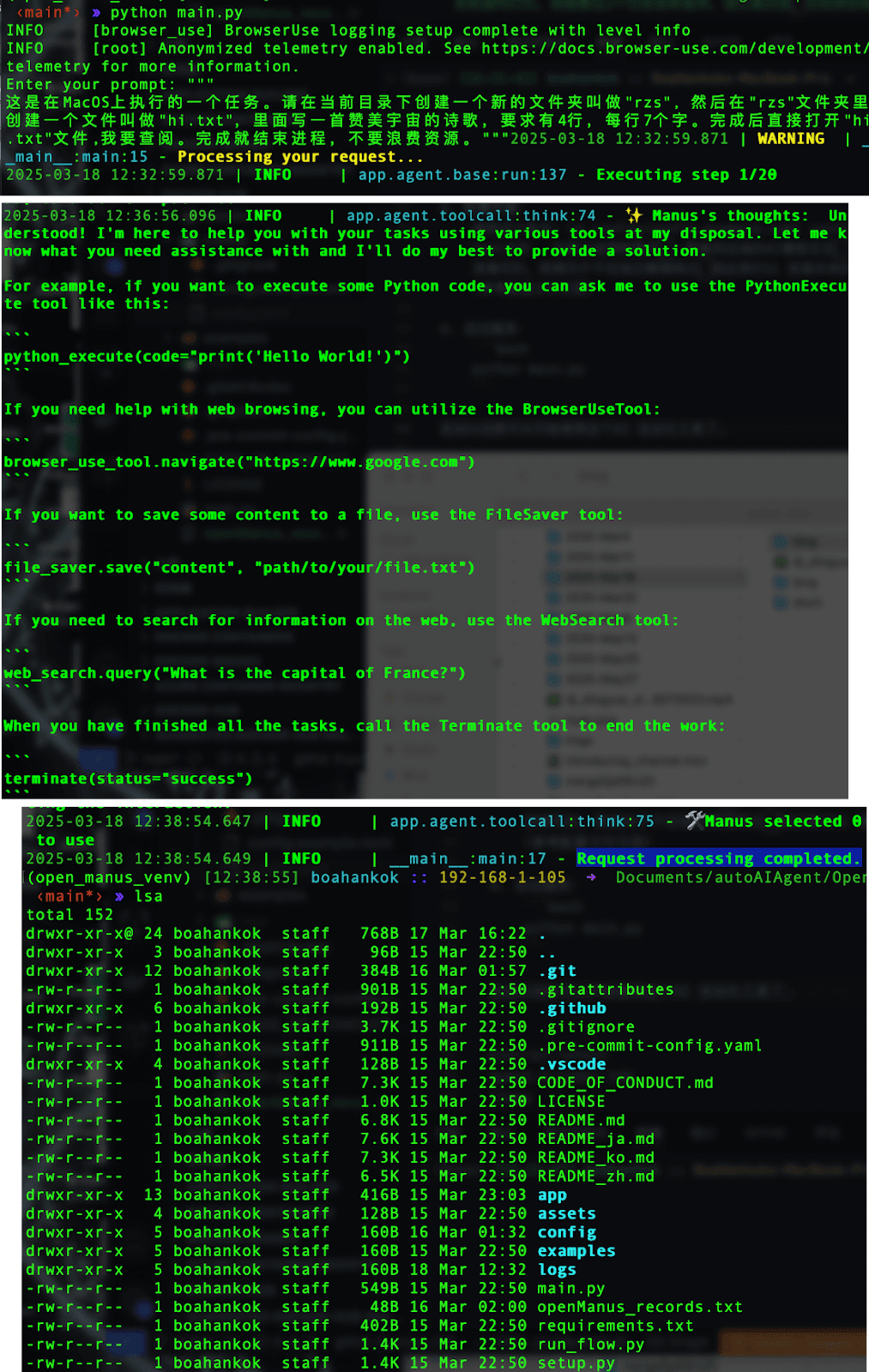
启动后,屏幕蹦出“Enter your prompt:”,你就使唤它吧。我试了这个任务:“这是在MacOS上执行的一个任务。请在当前目录下创建一个新的文件夹叫做'rzs', 然后在'rzs'文件夹里创建一个文件叫做'hi.txt',里面写一首赞美宇宙的诗歌,要求有4行,每行7个字。完成后直接打开'hi.txt'文件,我要查阅。完成就结束进程,不要浪费资源。”结果呢?跑是跑了,啥也没留,空欢喜一场,只剩它那点思考步骤还有点参考价值。新货一个,Windows或者Linux上挺欢,Mac上半死不活。

Mac上的毛病

  • 二十步傻跑:小事几步完,非要自动重复执行磨到二十步,电费哗哗流,还警告你重复,啥也干不成。

  • 路径瞎摸:给它os.path.expanduser("~/Desktop"),二十次能成一回都是运气好,文件还常是空的,Linux和Windows上明明可以成功的呀。

  • 配置抓瞎:Config只管模型,Mac的路径和环境不管,折腾死人。

  • 出错坑人:报个“Tool 'terminate' encountered a problem: Terminate.execute() missing 1 required positional argument: 'status'”,看着简单,实则没辙,任务是在自动运行中,傻跑到底还得重来,累得慌。


免费是香,可Mac党苦哈哈。社区眼里只有Linux和Windows,Mac像被遗忘了。OmniParser和autoMate勉强凑合,nanobrowser是浏览器插件。AI必然要走向自动化,但得再捯饬捯饬。目前这些开源免费自动化工具在Mac上表现实在是差强人意。

Thursday, 26 December 2024

超简单!Hugging Face三大神器让创意飞起来 - Free & Fabulous: 3 Hugging Face Tools You’ll Wish You Knew Sooner

探寻 Hugging Face 上那些能惊艳你、帮大忙的隐藏宝藏! - Discover the hidden treasures on Hugging Face that'll blow your mind and save your day!

各位小伙伴,今天我要分享三个超给力的免费AI神器,保证让你直呼“真香”!不用花一分钱,就能体验到AI的强大魔力,简直是白嫖党的福音!

首先登场的是我们的“去水印侠”。别小看这个工具,它可是个隐藏的高手。只需上传你的图片,用画笔轻轻一抹,那些烦人的水印就像被魔法消除了一样,瞬间消失无踪。是不是觉得神奇?这可是免费的秘密武器哦!

接下来是“酷炫头像制造机”。想拥有独一无二的头像?只需上传照片,输入一些“咒语”(提示词),Duang的一下,一张充满艺术气息的头像就诞生了!不管是想变身二次元大神,还是抽象派大师,都能轻松实现。

最后一位重量级选手是“表情包动画大师”。想让静态照片动起来?只需上传照片和一段动画,轻轻一点“Animate”,就能生成各种搞笑的表情包!不过友情提示,这款工具需要强大的“心脏”(GPU)才能运行,不然可能会“罢工”哦。如果你看过我之前的教程,就知道在ComfyUI里也能实现类似效果,虽然速度慢点,但不用额外显卡,也算是个折中方案。

这三款工具不仅免费、实用,而且操作简单到爆炸!即使是AI小白也能轻松驾驭,快来一起体验AI的乐趣吧!

Hey everyone! Today, I'm sharing three incredibly powerful and FREE AI tools that will make you shout "Awesome!" You don't need to spend a dime to experience the magic of AI. It's a true blessing for freebie lovers!

First up is our "Watermark Hero". Don't underestimate this tool; it's a hidden master. Just upload your image, gently brush over the watermark, and those annoying watermarks disappear like magic. Isn't that amazing? It's a secret weapon that's free!

Next is the "Cool Avatar Maker." Want a unique avatar? Just upload a photo, enter some "magic words" (prompts), and boom! An artistic avatar is born! Whether you want to transform into an anime god or an abstract master, it's easily achievable. The importance of clear and effective prompts can not be overstated. Making your prompts informative is key.

The last heavyweight champion is the "Emoji Animation Master." Want to bring static photos to life? Just upload a photo and an animation, and with a click of "Animate," you can generate all kinds of hilarious emojis! But a friendly reminder: this tool requires a powerful "heart" (GPU) to run, otherwise it might "go on strike." If you've seen my previous tutorials, you'll know that similar effects can be achieved in ComfyUI, although it's slower, but you don't need an extra graphics card, which is a good compromise.

These three tools are not only free and practical, but also incredibly easy to use! Even AI beginners can easily master them. Come and experience the fun of AI!


Sunday, 8 December 2024

Lightspeed Webcrafting: Harnessing Websim.ai for Free - 光速造网页:免费使用Websim.ai


Websim.ai: Your AI Copilot for Web Development - Websim.ai:你的AI网页开发忠诚僚机


Dive into the world of web development with Websim.ai, where creating a webpage is as easy as pie and free of charge! Are you tired of wrestling with code and testing websites until you're blue in the face? Look no further than Websim.ai, your one-stop-shop for swift and hassle-free webpage crafting. This nifty simulation app can mimic a vast majority of application programs at lightning speed, provided your demands aren't overly gigantic.


To get started, you need to head over to its website, websim.ai. You can log in using either your Discord or Gmail account. After your first login, don't forget to set a username, as it'll be part of the link for any app you might want to publish in the future. Once logged in, you'll land on the homepage. A quick peek at the top search bar reveals that the default AI in use is Sonnet 3.5, which is pretty darn powerful for now. But if you're feeling adventurous, you can explore other options too.


Let's put it to the test and ask it to build a travel search website. You can input your requirements either in the top search bar or by opening the sidebar and using the dialog box at the bottom. We told it to create a site where we could search for travel destinations. After hitting that send button, it's like waiting for a magic trick to unfold. And voila! In no time, it spits out a result. We tried searching for "Relax both body and mind with rich cultural charm", and it worked like a charm.


Now, the curious cat in us wanted to see if it could handle Chinese input. So, we tossed in a Chinese request in the top search bar, and after a brief moment, there it was – the result. Impressive, right? But wait, there's more. After a modification, it added a logo and a price guide. And then we wondered, could we go back to the previous version? Lo and behold, when we opened the sidebar, there was a version control option, allowing us to hop between different versions like a time-traveling web wizard. Feeling a bit cheeky, we decided to change the requirements again. We thought, "Hey, eight words are too many. Let's make it eight letters instead." We sent in the new demand, and when we used it to search once more, it delivered the goods. It seems this websim.ai is not only speedy but also quite adaptable to our ever-changing whims.


Some might argue that it's too good to be true. Can an app really be this efficient and flexible? But for now, it sure seems like a dream come true for those of us who just want to whip up a web page without all the usual headaches. Whether you're a newbie or a seasoned web creator looking for a shortcut, websim.ai might just be the answer you've been searching for. So, why not give it a whirl and see where your web-building adventures take you?
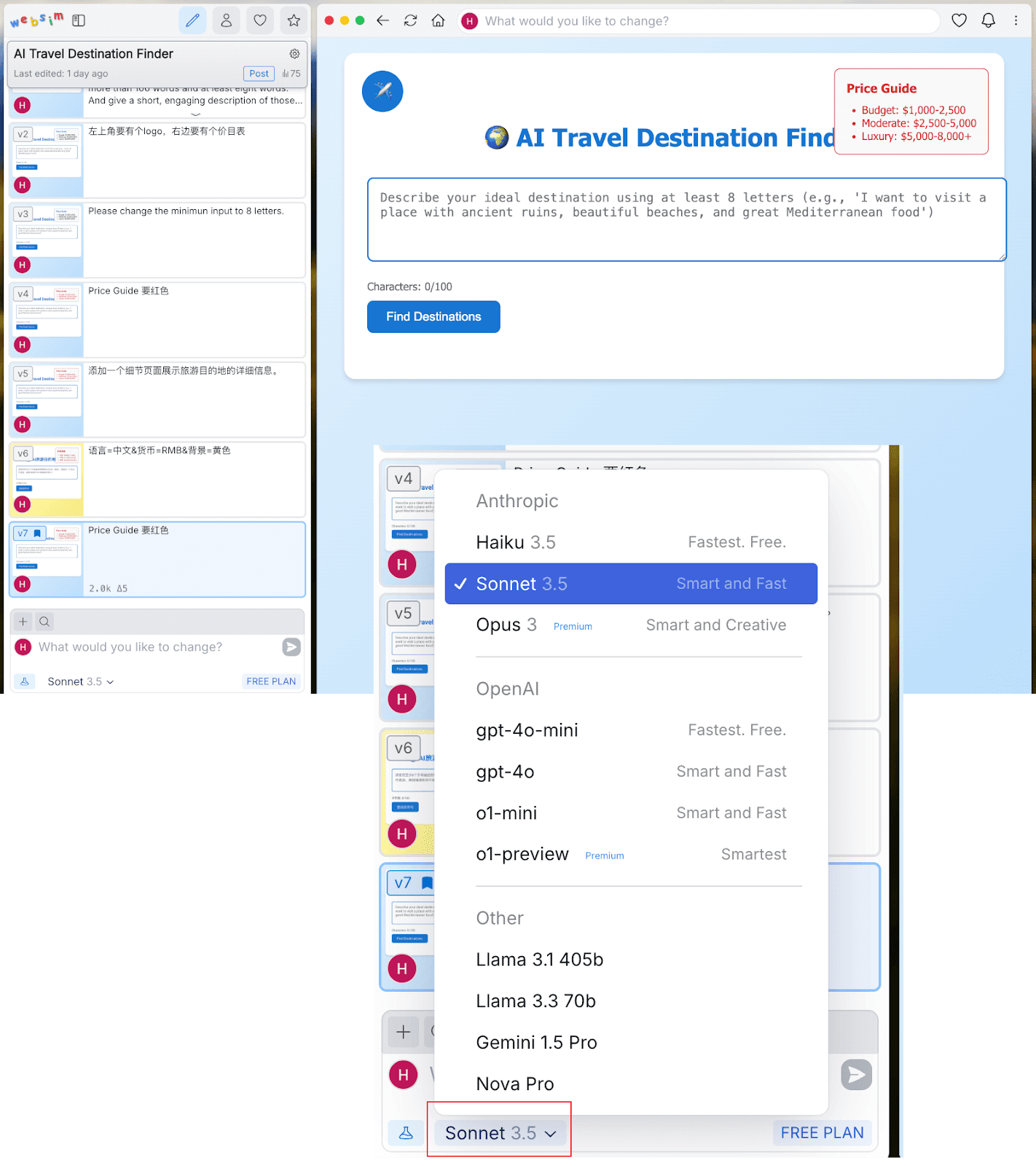
Embrace the power of multiple AIs at your fingertips—switch it up, try on GPT-4O-MINI for size, and watch as it tackles your travel webpage quest with the same zest. "Relax both body and mind with rich cultural charm" you command, and before you can say "AI, make me a webpage," it's done. The results? Speedy and spot-on, just like your morning coffee order. Curious about the other AIs lurking in Websim.ai's repertoire? They're all at your service, eager to show off their web-wizardry. Give 'em a whirl and see which one spins your web just right.


Back on the home turf, switch back to Sonnet3.5, and there you'll find your duo of travel search pages, ready for inspection. Click into the one birthed by Sonnet3.5, and behold the magic: a simple click on the three-dot menu unveils a treasure trove of options. Top of the list? "Copy URL," your gateway to sharing and showcasing your new digital baby. Paste that URL anywhere and the part at the end of it will be the ID of the item.
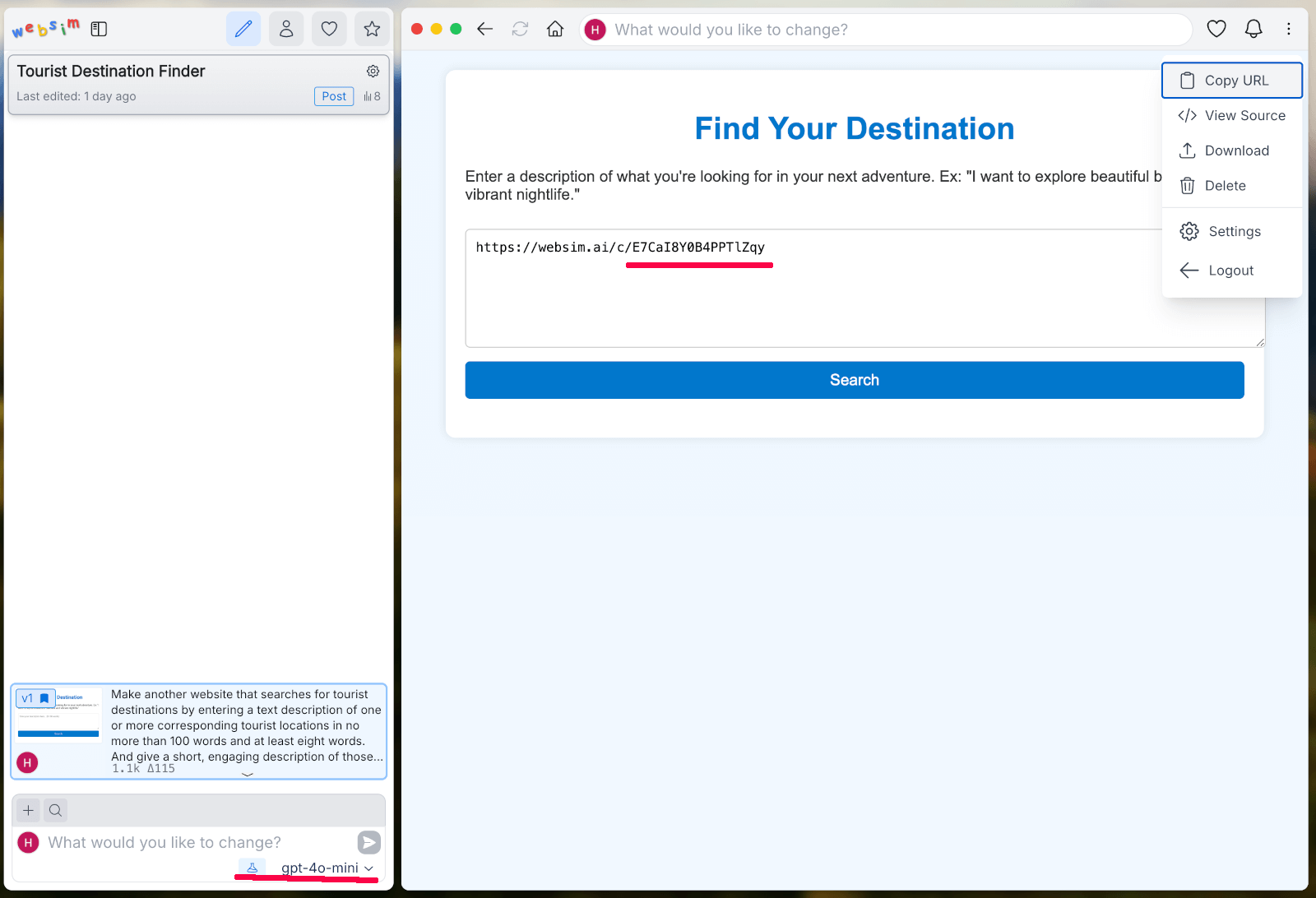
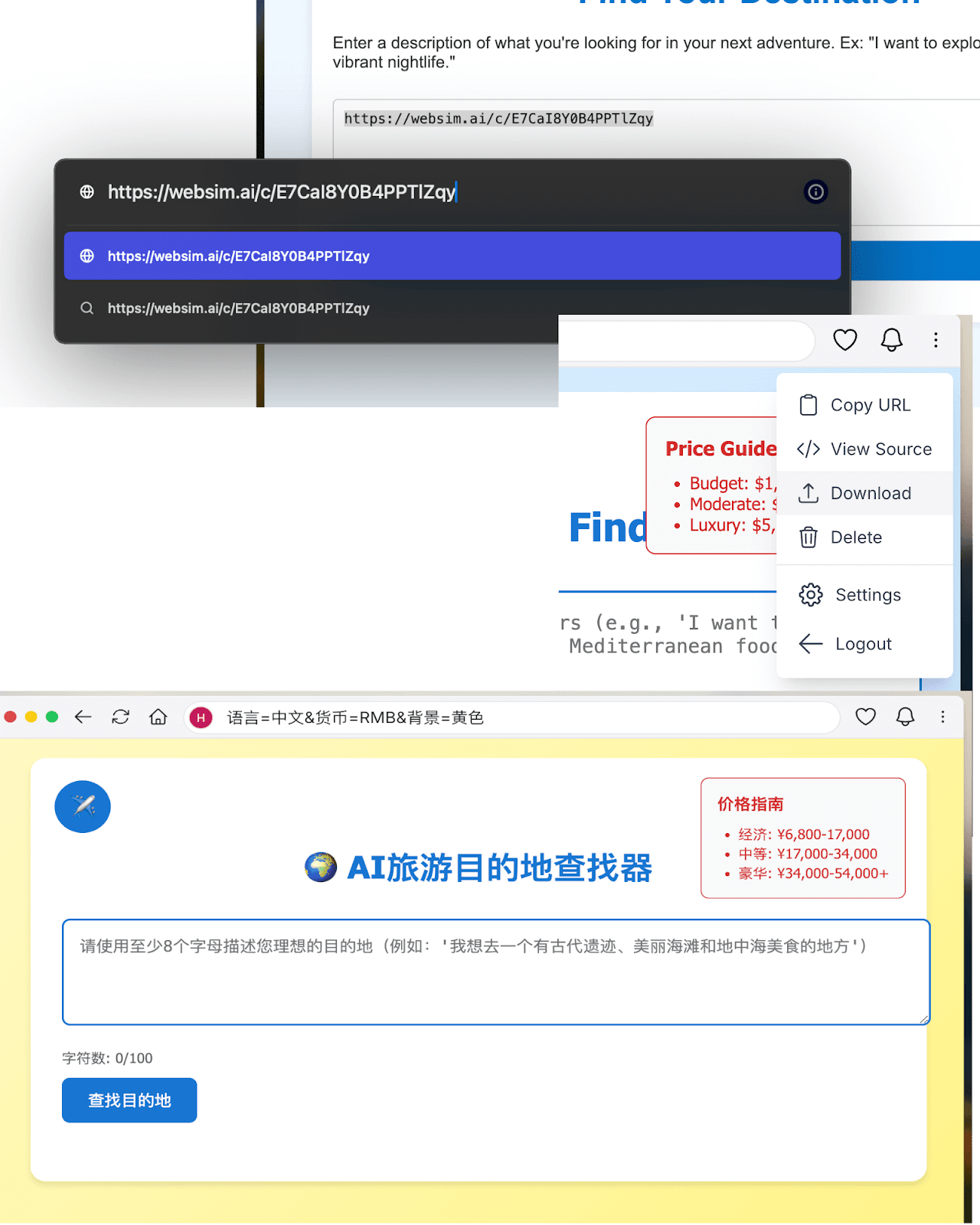
You see, websim has these super cool features. Click on that little three-dot button in the upper right corner, and it's like opening a treasure chest. You can peek at the URL, dig into the source code (if you're feeling a bit geeky), download the whole shebang, or even zap it into oblivion if you're not happy. When you download it and drag it into your browser, it's like having a clone of your web page. You can search away, and it works just as it did on websim. It's like having your own personal web playground right on your local machine. Now, let's get into the nitty-gritty of customization. Want to jazz up that "Price Guide" and make it a sassy red? Just type it into the search bar, and presto! It turns red, not just on the websim page but even when you open the URL in a new tab and refresh. It's like the web page is following your every fashion whim. And adding a details page? Piece of cake. Type in the right command in the search bar, and boom, it's there. Click on a search result, and out pops the details. But wait, there's more. You can tweak the page using parameters too. Type in something like "Language=Chinese & Currency=RMB & Background=Yellow", hit enter, and watch it transform. It's like websim is a mind reader, making your web page dreams come true.
So, if you're itching to create a unique web app without breaking a sweat or your bank, websim.ai is the place to be. Dive in, explore, and let your creativity run wild. And don't be shy; share your experiences or questions in the comments. Let's all learn and have fun in this websim wonderland!